 Offers
 Packs & Gifts
 Featured
 Brands
 Blog
BlogAccess and user account
Registering as a customer at Farmaten is quick and easy. You only need an email address and to create a password:
- You can create an account at any time using this form.
- You can create an account during the checkout process.
You also have the option to use your Google account to register and log in with just one click.
- On the login page, click "Forgot your password?".
- Enter your email address in the form and click submit.
- If you entered the same email address you used to register, you'll receive an email with a link to reset your password.
- You can now set a new password in My Account > About
Yes, of course. Log in and go to My Account:
- In "Information" you can change your password, name, and email address. You can also subscribe or unsubscribe from the newsletter.
- In "Addresses" you can add or edit your delivery addresses. Please note that this does not affect orders already placed.
- In "Social Account Linking" you can link or unlink your customer account with social media for easier access with just one click.
- In "GDPR Personal Data" you will find information on how to access, manage, or request the deletion of your data.
- In "My Product Requests" you can edit your orders or remove any stock replenishment notifications you may have added.
- In "Your Cookie Settings" you can manage your cookie consent.
Subscribing to the newsletter to stay informed about promotions and new products is very easy:
- When creating your account, check the box to receive marketing communications.
- If you already have an account, go to My Account > Information and check the box to receive marketing communications.
- You can also use this subscription form.
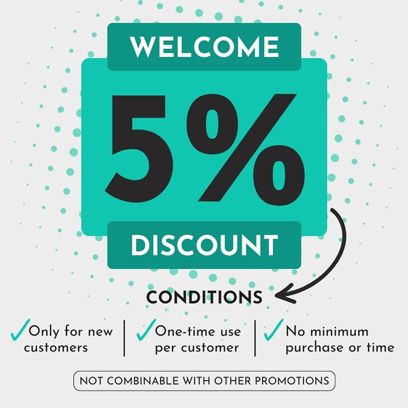
By subscribing to the newsletter, you will receive a 5% discount code for your next purchase. This discount cannot be combined with other promotions. One use per customer. Not applicable to medications, COVID tests, infant formula, some medical devices, and certain food supplements and plant protection products.
If you want to stop receiving marketing emails, you have two options:
- Change your preferences to receive only what interests you: At the bottom of each marketing email, you'll see a "change preferences" link that allows you to choose which topics and types of products you want to receive offers for.
- Unsubscribe from all marketing emails: You will stop receiving notifications of exclusive offers and promotions. At the bottom of each marketing email you've received, there's an "unsubscribe" link that allows you to unsubscribe with a single click.
If you have trouble unsubscribing or would like to share ideas about what kind of offers and information you'd like to receive, please contact us.
- Cambiar tus preferencias para recibir solo lo que te interesa: en el pie de cada email comercial verás un enlace “cambiar preferencias” que te permitirá elegir qué temáticas y tipos de productos quieres recibir ofertas.
- Desuscribirte de todos los emails comerciales: dejarás de recibir notificaciones de ofertas y promociones exclusivas. En el pie de cada email comercial que has recibido hay un enlace “cancelar suscripción” que te permite desuscribirte con un solo click.
Si tienes problemas para desuscribirte o quieres compartir ideas sobre qué tipo de ofertas e información te gustaría recibir, por favor, contáctanos.
It allows you to register and shop more easily, check order status, receive notifications about offers, repeat orders, create a favorites list, and access better Farmaclub discounts.